
HaulVision Shader Studio
Standalone ATS 1.61.1.1 shader inspection, dumping, faithful HLSL reconstruction, interface validation, and live replacement testing. This guide is completely offline and ships with the clean source/release package.
HaulVision Shader Studio is intended for shader development, inspection, validation, and short live hot-swap tests. The live replacement feature exists so an author can quickly verify an edited shader in ATS, compare it against the native shader, then restore the original. It is not intended to remain active for normal gameplay or to be distributed as the runtime for a finished graphics mod.
Shader Studio deliberately carries a large 1.61 shader catalog, engine-registry discovery, DXBC fallback data, capture hooks, validation, workspace generation, and editor tooling. Those development systems add complexity and overhead that a finished mod should not need. Once a shader is validated, move the finished replacement into a purpose-built release/runtime implementation and use Shader Studio only when additional testing is required.
1. Installation
After a successful Release x64 build, use the contents of dist\release.
Copy the contents of dist\release into American Truck Simulator\bin\win_x64.
The plugin loads from the ATS plugin folder. No ReShade DLL or .addon64 is used.
F8 opens/closes Shader Studio. While open, Shader Studio captures mouse/keyboard input so ATS does not steer the camera underneath the UI.
American Truck Simulator\bin\win_x64\
└─ plugins\
   ├─ HaulVisionShaderStudio.dll
   └─ HaulVisionShaderStudio\
      ├─ data\
      │  ├─ effect_shader_runtime_catalog.csv
      │  ├─ effect_pass_runtime_catalog.csv
      │  ├─ effect_catalog_metadata.json
      │  └─ dxbc_cache\
      ├─ captures\
      └─ logs\
HaulVisionShaderStudio data folder as well as the DLL. Registry-only shaders use the DXBC fallback cache when ATS has already released their in-memory bytecode.2. Building from source
Double-click BUILD_HAULVISION_SHADER_STUDIO_1_61_1_1.bat. Visual Studio 2022 with Desktop development with C++ is required. Python 3 is optional for normal builds because this clean package already includes the 1.61.1.1 catalogs and DXBC cache.
effects.zip beside the BAT. If Python 3 is available, the build script regenerates the shader/effect catalog, validates it, then rebuilds the exact DXBC fallback cache before compiling the DLL.3. Using Shader Studio in game
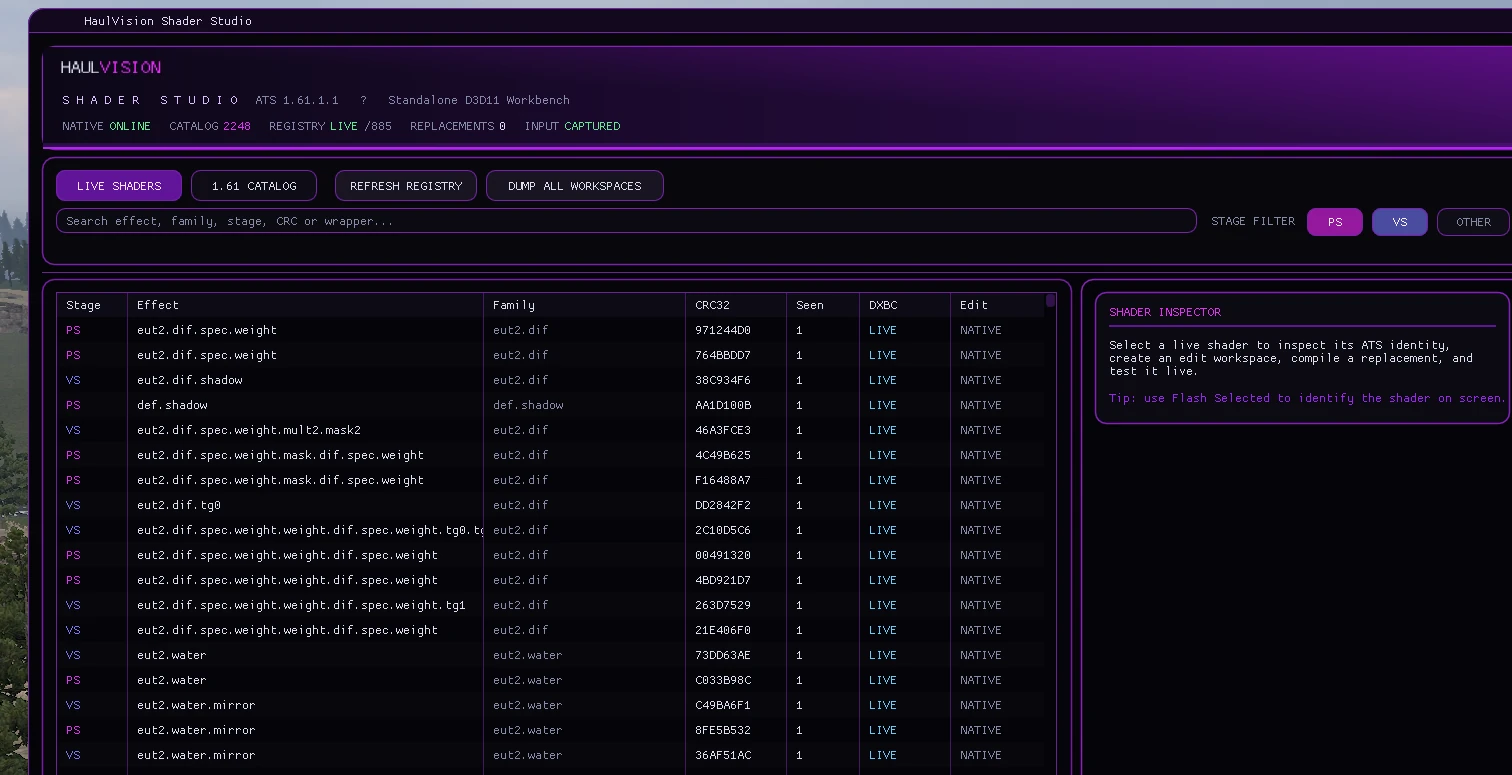
Live Shaders
Shows shader objects currently known to ATS. Shader names are resolved from current SCS object identities and/or exact DXBC fingerprints.
Use the search box for names such as sky, fog, water, or a CRC32.
1.61 Catalog
Shows the full current catalog even when a shader has not yet appeared in the live registry. Use this to confirm an identity exists and inspect mappings.
PS / VS / Other
Filter pixel and vertex shaders independently. Faithful HLSL compile/load currently targets Shader Model 5 PS and VS.
Flash Selected
Temporarily blinks draws using the selected PS/VS, making it easier to determine exactly what the shader affects. Stop Flash before judging final rendering.
4. Dumping and creating a shader workspace
Select a live shader, then use Create / Refresh Workspace. Shader Studio resolves the exact original DXBC from live memory when possible, otherwise from the verified 1.61.1.1 catalog cache.
Every workspace is organized by stage → effect → full shader identity:
captures\PS\eut2.sky\
└─ PS_391AD521_0FF00CFEF8FD1EA0_eut2.sky\
   ├─ PS_391AD521_0FF00CFEF8FD1EA0_eut2.sky_original.dxbc
   ├─ PS_391AD521_0FF00CFEF8FD1EA0_eut2.sky_faithful.hlsl
   ├─ PS_391AD521_0FF00CFEF8FD1EA0_eut2.sky_replacement.dxbc
   ├─ PS_391AD521_0FF00CFEF8FD1EA0_eut2.sky_live.dxbc
   ├─ PS_391AD521_0FF00CFEF8FD1EA0_eut2.sky_live.asm
   ├─ PS_391AD521_0FF00CFEF8FD1EA0_eut2.sky_faithful_compile.log
   ├─ PS_391AD521_0FF00CFEF8FD1EA0_eut2.sky_faithful_validation.txt
   └─ PS_391AD521_0FF00CFEF8FD1EA0_eut2.sky_shader_info.txt
5. Editing faithful.hlsl
The faithful file is reconstructed from the real DXBC and compiled back using the original shader profile (ps_5_0 or vs_5_0). The safest workflow is to change shader math while preserving the original interface contract.
Usually safe edits
- Change arithmetic inside
main. - Adjust tint, exposure, contrast, fog strength, alpha, blends, or other calculations.
- Change numeric constants used by existing calculations.
- Change how existing texture/cbuffer values are combined.
- Keep existing inputs, outputs, texture slots, sampler slots and constant-buffer layouts intact.
Common causes of rejection
- Renaming/removing input or output semantics.
- Moving a semantic to another register or changing its component type.
- Adding/removing ordinary texture, sampler, UAV or cbuffer bindings.
- Changing a cbuffer's slot or byte size.
- Changing comparison-sampler behavior.
- Deleting declarations merely because they appear unused.
- Changing the entry point name from
main.
6. Shader validation — how to get clean replacements
Compile + Load Faithful HLSL does not blindly inject whatever compiled. Shader Studio first compiles the HLSL, then reflects/disassembles the rebuilt DXBC and compares its game-facing interface with the original ATS shader.
| Validation area | What Shader Studio checks | What you should preserve |
|---|---|---|
| Input signature | Semantic name/index, register, component mask/type, system value. | Do not rename, remove, reorder into different registers, or alter types. |
| Output signature | Semantic name/index, register, component mask/type, system value. | Keep the same render-target/output contract. |
| Constant buffers | Binding type, slot, count and cbuffer byte size. | Keep the original slot and exact size unless using a supported Studio extension. |
| Samplers | Slot/count and whether it is a comparison sampler. | Do not convert ordinary samplers to comparison samplers or vice versa. |
| Other resources | Binding contract including slots/counts and resource characteristics. | Reuse the original texture/resource bindings instead of adding/removing them. |
The result you want
MISMATCH_CLASS=NONE
RESULT=COMPATIBLE
The rebuilt shader is replacement-ready only when RESULT=COMPATIBLE.
When the validation report ends with RESULT=COMPATIBLE, Shader Studio copies the accepted build to the identity-named _replacement.dxbc and the UI can load it.
If the shader compiles but validation fails
MISMATCH_CLASS=GENERAL_INTERFACE_MISMATCH
RESULT=REJECTED
Do not force-load that shader. Shader Studio moves rejected compiled output to an identity-named _live_REJECTED.dxbc. Open the matching _faithful_validation.txt and find the first MISMATCH line.
Restore the original semantic, register, mask, component type and system-value declaration.
Restore the original texture/sampler/cbuffer binding. Avoid declaring a new resource only for convenience.
The rebuilt shader has gained or lost an interface item. Compare declarations against the untouched faithful file.
Read _faithful_compile.log. This is an HLSL syntax/type/include/compiler failure, not an interface-validation failure.
Automatic repair categories
Shader Studio can recognize narrowly defined cases such as sparse signature masks, semantic register/lane layout changes, or an original resource-declaration superset. It may attempt an exact interface-skeleton repair. If the report still ends in RESULT=REJECTED, treat it as rejected.
dxbcSigner.dll. The clean standalone package does not include that external signer. The most reliable user workflow is therefore to preserve the original interface so the shader passes validation without needing signature repair.Standard Shader Studio b13 extensions
| Define | Slot | Maximum accepted size | Registers |
|---|---|---|---|
#define HVSS_USE_PARAMS_4_V1 1 | b13 | 64 bytes | 4 × float4 |
#define HVSS_USE_PARAMS_8_V1 1 | b13 | 128 bytes | 8 × float4 |
#define HVSS_USE_PARAMS_12_V1 1 | b13 | 192 bytes | 12 × float4 |
#define HVSS_USE_PARAMS_16_V1 1 | b13 | 256 bytes | 16 × float4 |
When Shader Studio creates any shader workspace it also creates captures\_shared\HVSS_StandardBuffers.hlsli. Add one profile define before including that file:
#define HVSS_USE_PARAMS_8_V1 1
#include "HVSS_StandardBuffers.hlsli"

// 8 neutral float4 registers are now declared at b13.
// Give each lane a meaning that makes sense for your replacement.
float exposure = HVSS_PARAM1(0, 0);
float contrast = HVSS_PARAM1(0, 1);
float4 userColor = HVSS_PARAM4(1);
HVSS_PARAMS is intentionally present at b13. It does not change ATS's native shader interface and it does not authorize new textures, samplers, UAVs, or other cbuffers.HVSS_PARAMS. A runtime that wants live custom values must bind a matching constant buffer to b13. If nothing binds it, treat the values as unavailable/zero and keep a safe fallback path in the shader.Custom standard size without editing Shader Studio source
If 64/128/192/256 bytes do not fit your project, choose any size from 16 through 256 bytes in 16-byte increments. Define the number of float4 registers, then include the same standard header:
#define HVSS_USE_CUSTOM_PARAMS_V1 1
#define HVSS_CUSTOM_PARAMS_FLOAT4_COUNT 6
#include "HVSS_StandardBuffers.hlsli"

// 6 × 16 bytes = a 96-byte maximum b13 layout.
float strength = HVSS_PARAM1(0, 0);
float radius   = HVSS_PARAM1(0, 1);
float4 tint    = HVSS_PARAM4(1);
Valid custom counts are 1..16. Shader Studio parses the count from the HLSL and records it in the validation report and the generated *.atsvt.ini sidecar. A count of 6, for example, authorizes up to 96 bytes.
How to design a clean custom parameter layout
- Confirm b13 is free in the original shader. Search the untouched faithful HLSL/assembly and validation resource list. If ATS already owns b13 for that shader, do not add an HVSS b13 extension.
- Choose the smallest profile that fits. Four scalar/vector registers often cover tint, strength, ranges, and toggles. Do not choose 256 bytes just because it is available.
- Keep each logical parameter stable. Document what each lane means, for example
hvss_param[0].x = exposureandhvss_param[1].xyz = tint. Treat that mapping as your ABI. - Use one extension only. Do not combine multiple
HVSS_USE_*profiles. Each standard profile targets the same generic b13 extension slot. - Do not exceed the declared count. With
HVSS_USE_PARAMS_4_V1, valid indexes are 0–3. With a custom count of 6, valid indexes are 0–5. - Preserve the ATS interface. The extra b13 block is the only authorized addition. Inputs, outputs, original cbuffers, textures, samplers and slots still have to validate exactly.
- Read the report after every compile. A clean generic extension reports
HVSS_STANDARD_EXTENSION=...,HVSS_STANDARD_SLOT=13, its float4 count/max bytes, then ends withRESULT=COMPATIBLE.
A successful 8-register preset will contain lines similar to:
HVSS_STANDARD_EXTENSION=HVSS_PARAMS_8_V1
HVSS_STANDARD_SLOT=13
HVSS_STANDARD_FLOAT4_COUNT=8
HVSS_STANDARD_MAX_BYTES=128
authorized_resource_additions=1
MISMATCH_CLASS=NONE
RESULT=COMPATIBLE
D3DCompile may reflect a smaller cbuffer if your HLSL only reads the first few registers. Shader Studio therefore accepts a standard extension up to the selected profile's maximum size rather than requiring unused tail registers to survive compilation.
Creating a named standard preset for a distributed project
Most users should use HVSS_USE_CUSTOM_PARAMS_V1; it avoids C++ changes. If you maintain a project and want a stable named preset such as HVSS_USE_MYPROJECT_V1, use the following pattern:
- Add the named profile to
graphics\hvss_standard_buffers_source.hppand map it to a fixedHVSS_PARAM_FLOAT4_COUNT. - Add a matching entry to
kStandardExtensionsingraphics\dxbc_faithful_decompiler.cppwith the define name, public layout name, and float4 count. - Keep the slot at
b13unless you also intentionally redesign the validator/runtime contract. The stock standard validator only authorizes the generic extra cbuffer at b13. - Bump the preset version when its byte layout changes. Never silently redefine an existing
_V1layout. - Document every lane and provide a runtime that binds the same byte size/slot if the shader expects live values.
- Compile one edited shader and confirm the report shows the expected profile and
RESULT=COMPATIBLEbefore distributing it.
7. Loading and testing a replacement
- Select the shader in Live Shaders.
- Create/refresh its workspace once.
- Edit the identity-named
_faithful.hlsl. - Click Compile + Load Faithful HLSL.
- Only a successfully validated build is accepted by this path.
- Use Replacement enabled to A/B test edited vs native rendering.
- Use Restore Original ATS Shader to unload the replacement completely.
8. Troubleshooting
| Symptom | Check |
|---|---|
| Shader name is UNMAPPED | Make sure the current runtime catalog/data folder was copied with the DLL. Refresh Registry after the scene finishes loading. |
| Dump button exists but ATS released live DXBC | The installed data\dxbc_cache must match the catalog. The cache supplies exact catalog DXBC when live bytes are gone. |
| No faithful HLSL | Faithful reconstruction currently targets SM5 PS/VS and may reject unsupported DXBC instructions/resource types. The original DXBC can still be dumped. |
No D3DCompiler DLL was available | The faithful compiler looks for d3dcompiler_47.dll, then 46, then 43. Repair/install the applicable Windows DirectX compiler component. |
| HLSL compiled but did not load | Open the identity-named validation report. A compile success is not enough; the report must say RESULT=COMPATIBLE. |
| Replacement behaves incorrectly | Disable it immediately, restore the original ATS shader, then review the edit. Passing interface validation guarantees the binding contract, not that the shader math produces the intended visual result. |
9. Clean package contents
This clean source intentionally excludes old ReShade/ATS Visual Toolkit artifacts, 1.60 target tables, historical phase notes, legacy replacement packs, unused database/decompiled placeholders, obsolete build scripts, and generated Python cache files.
HaulVision_ShaderStudio_STANDALONE_ATS_1.61.1.1_STANDARD_EXTENSIONS\
├─ BUILD_HAULVISION_SHADER_STUDIO_1_61_1_1.bat
├─ HaulVisionShaderStudio.sln
├─ HaulVision_Shader_Studio_Offline_Guide.html
├─ README.md
├─ LICENSE
├─ build\
├─ src\HaulVisionShaderStudio\
├─ tools\
└─ data\
   ├─ current 1.61 catalog files
   └─ dxbc_cache\